Product Tour

Six steps through the ReleaseGuard release process

From the dashboard your team opens every morning to the audit trail that answers an inspector's questions — this is what a controlled release looks like end to end.

01 Start of day

Everything waiting on you, on one screen

The dashboard is the first page your team sees. It surfaces the work that matters to their roles — nothing more, nothing less — and points them straight to the next action.
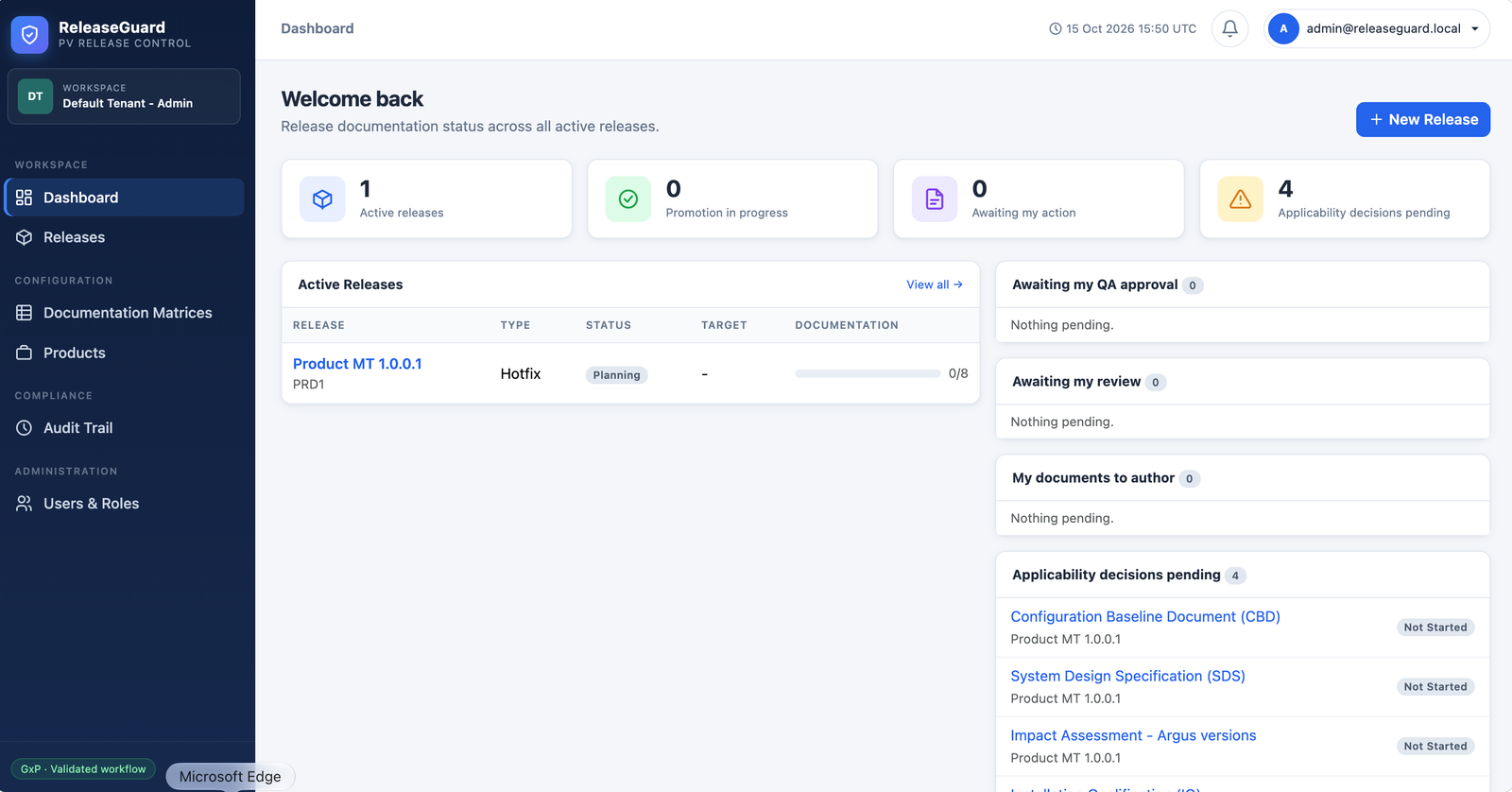
Role-aware queues. Authors see drafts to submit, reviewers see documents to sign off, QA approvers see stage gates awaiting authorisation.
Active release status. Promotion progress, target date, and documentation readiness for every release in flight.
Applicability decisions. Conditional documents that need a Needed / Not needed decision before the next gate — with a count of how many are pending.
Notifications bell. Unread items covering assignments, review requests, decisions, and matrix changes — each links to its source.
Role-aware queues
Pending decisions
releaseguard.local/dashboard
ReleaseGuard dashboard showing active releases, promotion progress, pending applicability decisions, and QA approval queues
02 Define once

A matrix that builds the checklist for you

A documentation matrix defines which documents are required, which are conditional, and which are not applicable — per release type. Every new release inherits the exact right checklist, automatically.
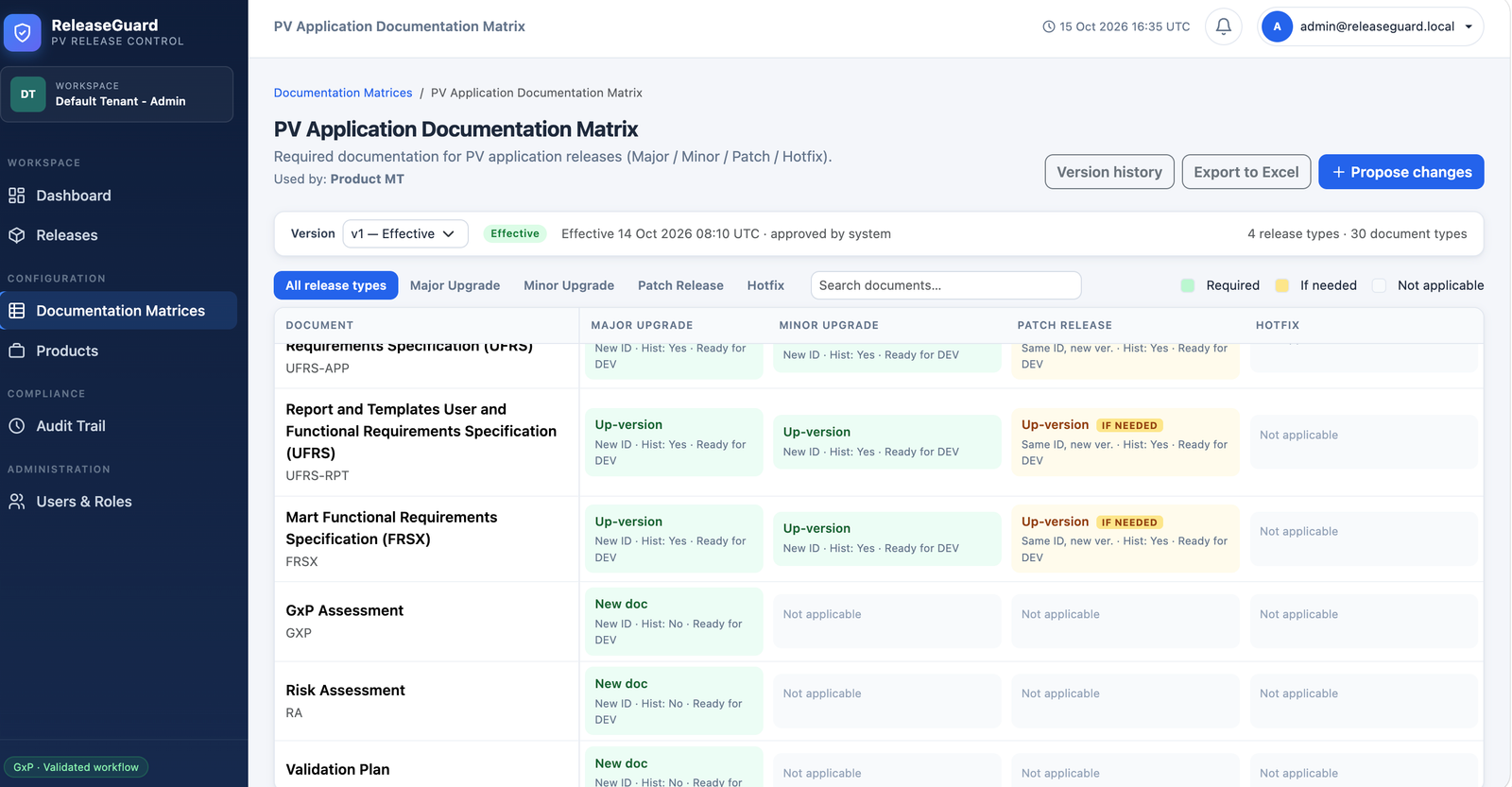
Required, conditional, or not applicable. Each document rule is explicit. No more "I think we need the SDS for this one."
Per release type. Major Upgrade, Minor Upgrade, Patch Release, and Hotfix can each carry a different rule set — side by side.
ID/version behaviour. Same-ID rules retain the previous document ID with a new version; new-ID rules require a different ID entirely.
Required-by-stage. Pin each document to DEV, VAL, or PROD so the gate that blocks is the gate that matters.
Per-release-type rules
Excel import/export
releaseguard.local/matrices/pv-app
PV Application Documentation Matrix showing required, conditional, and not-applicable documents per release type
03 Fine-grained

Every rule, spelled out

Click any cell in the matrix and you get the full rule — applicability, version behaviour, ID handling, history requirement, and the stage gate that must approve it. No hidden semantics.
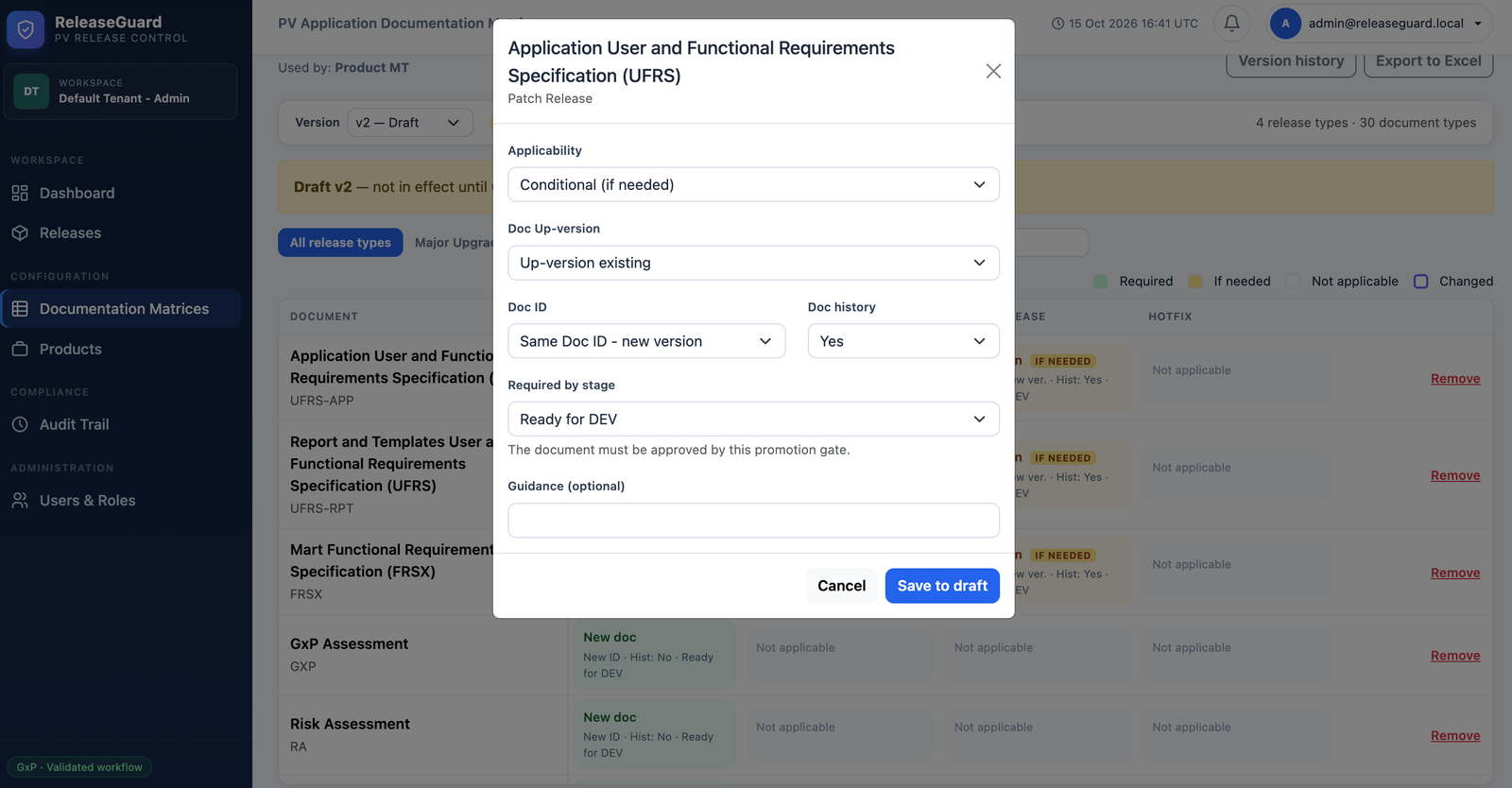
Applicability. Required, Conditional (if needed), or Not applicable — chosen per document and release type.
Up-version behaviour. Up-version existing, create as new, or leave untouched — the matrix decides.
Doc ID & history. Same ID with a new version, or a fresh ID; history updates enforced when required.
Required by stage. The gate that must approve this document — DEV, VAL, or PROD — with a clear reminder that the gate blocks progression.
Optional guidance. A short note that travels with the rule, so every author sees the same expectation.
Rule-level control
Stage-aware gate
releaseguard.local/matrices/pv-app · edit rule
ReleaseGuard rule configuration dialog setting applicability, up-versioning behaviour, document ID rule, history requirement, and required-by-stage gate
04 Nine stages · three gates

The release lifecycle, end to end

Nine stages, three hard gates. Deployments happen manually outside ReleaseGuard — the platform records the reference, the evidence, and the signature that authorised each promotion.

Planning → In Progress. A Release Manager starts the release; only then can assigned authors submit documents.
Ready for DEV · Ready for VAL · Ready for PROD. Three hard gates. The document gate is re-checked at every promotion.
Separation of duties enforced. The QA approver signing a gate must be a different person from the deployment recorder.
Return or cancel at any promotion. A release can be returned to documentation work with a reason — audit-trailed, never silent.
  • 1 · Planning

    Review checklist and assignments. Documents cannot be submitted yet.

  • 2 · In Progress

    Release Manager starts the release. Authors can now submit.

  • 3 · Ready for DEV Gate

    All DEV-gate documents approved; every conditional document decided.

  • 4 · DEV Deployed

    Release Manager records the manual deployment reference and evidence.

  • 5 · Ready for VAL Gate

    QA Approver signs the dev verification evidence — must differ from the recorder.

  • 6 · VAL Deployed

    Release Manager records the validation deployment reference and evidence.

  • 7 · Ready for PROD Gate

    QA Approver signs validation completion — must differ from the VAL recorder.

  • 8 · PROD Deployed

    Release Manager records the production deployment reference and evidence.

  • 9 · Released

    QA Approver signs production verification and final release authorisation.

05 Per document

A document's status is never set by hand

Every transition is a recorded action, performed by the right user, with an electronic signature and — where relevant — a file fingerprint. Statuses advance themselves; nobody types "Approved" into a column.

Decision pending → Not Required. Conditional documents get a Needed / Not needed decision with a justification and signature.
Not Started → Draft → In Review. The assigned author uploads a file, confirms metadata, and signs Submit.
In Review → Reviewed → Approved. Reviewer and QA Approver are separate humans. Rejection returns the document with a reason.
Reopen with reason. An approved document can be reopened; the release returns to In Progress and the change is audit-trailed.
1

Decision Pending

Record Needed or Not needed with justification and signature.

2

Not Started

Upload the file and enter ID/version to move to Draft.

3

Draft

Fix metadata or upload a revision, then sign Submit.

4

In Review

Assigned Reviewer signs Review or Reject with a reason.

5

Reviewed

Assigned QA Approver signs Approve or Reject.

6

Approved

Release Manager or QA Approver can Reopen with a reason.

06 Prove it later

Audit trail and release dossiers

Every action is written to an append-only audit trail, protected against editing or deletion. When an auditor asks, you don't scramble — you export.

Append-only by design. Database triggers refuse updates or deletes on audit records and electronic signatures.
Searchable and filterable. Administrators and QA Approvers filter by entity, actor, date, or action, then export to CSV or PDF.
Release dossier. One export bundles the approved file revisions, the signature manifest, the release audit CSV, and every checksum.
Preliminary until Released. The manifest is marked preliminary until the QA Approver signs final authorisation — no ambiguity about status.
Release dossier · RG-2026.4 Preliminary
Approved file revisions Every signed document at its final, approved revision
Verified
Signature manifest Author, reviewer, QA approver, stage gates, timestamps
PDF
Release audit trail Append-only record of every action across the release
CSV
SHA-256 checksums For every file revision included in the dossier
Signed
Who does what

Eight roles, no shortcuts

A user can hold more than one role — but a document's author, reviewer, and QA approver must always be three different people.

Administrator

Users and roles; matrices; product matrix change requests.

Release Manager

Products, releases, assignments, deployments, stage readiness.

Author

Document metadata and files; submits assigned documents.

Reviewer

Reviews or rejects assigned documents.

QA Approver

Approves documents, matrix versions, gates, and releases.

Manager

One of the three approvals for a matrix change request.

Quality Manager

One of the three approvals for a matrix change request.

Product Owner

One of the three approvals for a matrix change request.

Next step

See it with your own release data

15-minute walkthrough. We'll map your release types, your document set, and your gate structure onto a live ReleaseGuard instance — no signup, no slides.